Do you even OpenSCAP, SCC, and STIG Viewer? Part 1.
I was recently asked if I knew anything about these tools. I don’t. But I will recklessly pursue surface-level, dangerous knowledge. For science!
Plus, it’s 16 degrees and snowing outside.
Before I get get started it’s important to note that I in fact, didn’t even know they were tools.
So, like any good knowledge worker, I set off to learn (and avoid the horrors of willful ignorance.)
Fun note - I am writing this live as I go. I write my articles in VS Code so I can upload them directly to my GitHub repo - which means no autofill and no spell-checking.
First stop, ChatGPT for a summary I can digest at 8:00 AM.
My delicate prompt:
1
"Dear ChatGPT, give a brief description of the following, their differences, and similarities: openscap, scap compliance checker, and STIG viewer"
ChatGPT’s Reply:
Overview:
OpenSCAP: An open-source framework for performing automated security compliance checks based on SCAP (Security Content Automation Protocol). Supports multiple standards like XCCDF, OVAL, and CPE for compliance scanning. Primarily used for Linux systems (RHEL, CentOS, etc.) but has some Windows support.
SCAP Compliance Checker (SCC): A proprietary tool developed by NAVWAR for the Department of Defense (DoD). Scans systems for compliance with DISA STIGs and other SCAP-compatible baselines. Freely available only to DoD personnel and contractors.
STIG Viewer: A tool for manually viewing, editing, and managing DISA STIG compliance checklists. Allows importing/exporting .ckl files and documenting compliance details. Used for manual validation rather than automated scanning.
Crap. SCC is DoD - I won’t be able to get my hands on that one.
That’s fine. This is fine. Everything is fine.
So, time to get OpenSCAP on linux workstation and see what that looks like but before -
1
"Dear ChatGPT, what can I expect, or give a brief summary of the process of installing OpenSCAP, running it, the output, and actions I can take or would normally be expected to take in a professional setting."
I am a prompt engineer. Clearly.
I am not going to bore you with the detailed response but just know this - it signed off with “Sincerely, ChatGPT”
Ok. Lets get reckless.
Naturally, we begin with -
1
sudo apt update && sudo apt upgrade -y
and a dash of this for clarity -
1
2
linuxadmin@Dual-Boot-Laptop:~$ cat /etc/os-release
PRETTY_NAME="Ubuntu 24.04.1 LTS"
Time to actually do something meaningful here -
1
sudo apt install openscap-utils -y
Again for clarity -
1
oscap --version
Curious? It’s OpenSCAP command line tool (oscap) 1.3.9
With that, I need to provide OpenSCAP some sort of library to judge my OS against.
In my travels, I came across Oval for Ubuntu found here:
https://ubuntu.com/security/oval
” Ubuntu OVAL data
Canonical’s Security Team produces Ubuntu OVAL, a structured, machine-readable dataset for all supported Ubuntu releases. It can be used to evaluate and manage security risks related to any existing Ubuntu components. It is based on the Open Vulnerability and Assessment Language (OVAL).”
This page actually would have been NICE TO HAVE FROM THE BEGINNING.
1
>=(
Keep moving forward, Shawn, deep breath and keep moving forward.
Actually, this is a PAINFULLY straightforward process. But like so many other PAINFULLY straightforward processes - sometimes you have to forge a path. OpenSCAP guides were not cooperating, so I went with Oval. Thus my frustration. There are no Ubuntu 24.04 guides out there and so trailblazing we go.
After following the above steps and executing the command below, I had success -
1
 sudo oscap oval eval --report report.html com.ubuntu.noble.usn.oval.xml
This gave a live stream of checks as they ran that looked like this x100
1
2
3
4
5
6
7
8
9
10
11
...
Definition oval:com.ubuntu.noble:def:71741000000: false
Definition oval:com.ubuntu.noble:def:71701000000: false
Definition oval:com.ubuntu.noble:def:71672000000: false
Definition oval:com.ubuntu.noble:def:71671000000: false
Definition oval:com.ubuntu.noble:def:71651000000: false
Definition oval:com.ubuntu.noble:def:71621000000: false
Definition oval:com.ubuntu.noble:def:71611000000: true
Definition oval:com.ubuntu.noble:def:71581000000: false
Definition oval:com.ubuntu.noble:def:71571000000: false
...
Once completed, I was able to open the reports file in an easy to digest, well-designed modern format in a comfy web browser..
Drum roll!
My vulnerabilities on display in all their 90’s-era, application design glory - Much like that era of design, it gives you what you need and nothing else. Considering I build up and tear down my OS quite frequently, I don’t really run any risks putting this out there.
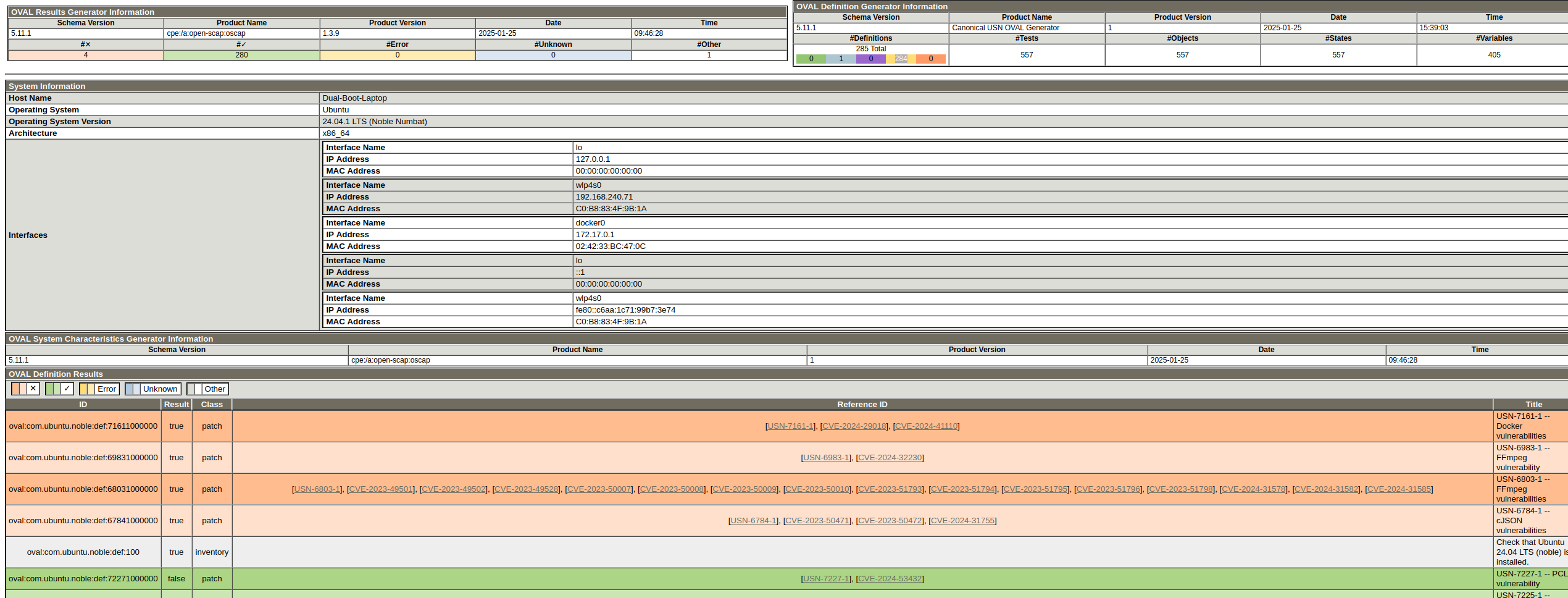
So, it looks like I have a few vulnerabilites worth remediating but so far none that are actually capable of being pathced in Noble 24.04 unless it’s pro.
Really, at the end of the day, this is like most vulnerability remediation - can we patch it? will it break something? can we accept the risk?
Of the four “True” vulnerabilities, only one could I fix for demonstration purpose, which would be to completely remove Docker for the sake of an image, and I just don’t think that’s prudent here.
I am 2.5 hours into this project and I think it’s time for some coffee. This was actually a bunch of fun and would recommend.
Thanks for reading!
1
print("Shawn L. Donahue")
“But wait… you didn’t even STIG!”
I know, hence the “Part 1”!